
Hexagonal Architecture in Next.js: Why Modern Applications Need It
4 min read
By Akash Patil
As Next.js applications grow from simple websites into large-scale products with authentication, payments, dashboards, APIs, and third-party integrations, one major problem starts appearing:
Your business logic gets tightly coupled to frameworks, APIs, and infrastructure.
This leads to:
- Hard-to-maintain code
- Difficult testing
- Painful refactoring
- Vendor lock-in
- Slow onboarding for new developers
This is where Hexagonal Architecture (also called Ports and Adapters Architecture) becomes extremely valuable.
What is Hexagonal Architecture?
Hexagonal Architecture is a software design pattern created by Alistair Cockburn that focuses on separating business logic from external systems.
The main idea:
Core business logic should not depend on:
- Next.js
- Database
- APIs
- Payment gateways
- Authentication providers
- UI frameworks
Instead:
External systems depend on your business core.
Simple Analogy
Think of your app like a smartphone charger port:
- Your phone = Core business logic
- USB-C / Lightning port = Ports
- Charger / Laptop / Power bank = Adapters
No matter what charger you use, your phone’s internal system remains the same.
Similarly, in your app:
- Business rules stay stable
- Infrastructure can change freely
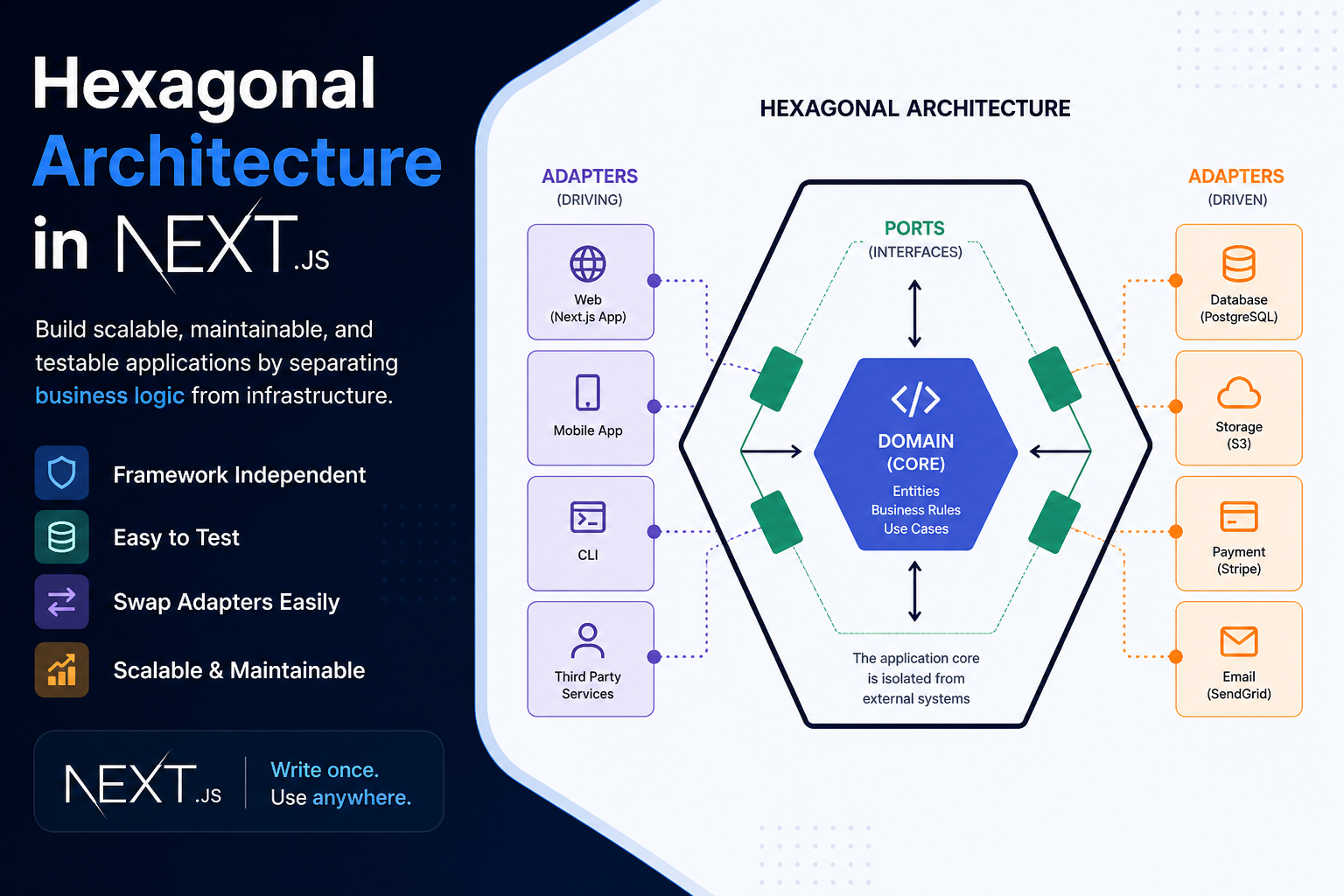
Core Components of Hexagonal Architecture
1. Domain (Core)
Contains:
- Business rules
- Entities
- Use cases
Example:
CreateUser
GenerateInvoice
CalculateDiscount
2. Ports (Interfaces)
Defines how the core communicates with outside systems.
Example:
UserRepository
PaymentService
EmailService
3. Adapters (Implementations)
Actual integrations:
- MongoDB
- PostgreSQL
- Stripe
- Clerk
- Firebase
Folder Structure in Next.js
src/
 ┣ domain/
 ┃ ┣ entities/
 ┃ ┣ use-cases/
 ┃ ┗ ports/
 ┣ infrastructure/
 ┃ ┣ db/
 ┃ ┣ auth/
 ┃ ┗ services/
 ┣ app/
 ┃ ┣ api/
 ┃ ┗ dashboard/
 ┗ shared/
Example in Next.js
Without Hexagonal Architecture
export async function POST(req: Request) {
  const body = await req.json()

  const user = await prisma.user.create({
    data: body
  })

  await sendEmail(user.email)

  return Response.json(user)
}
Problems:
- Route handler controls everything
- Prisma is tightly coupled
- Email provider is fixed
- Hard to test
With Hexagonal Architecture
Domain Port
export interface UserRepository {
  create(data: User): Promise<User>
}
Use Case
export class RegisterUser {
  constructor(private userRepo: UserRepository) {}

  async execute(userData: User) {
    return this.userRepo.create(userData)
  }
}
Adapter
export class PrismaUserRepository implements UserRepository {
  async create(data: User) {
    return prisma.user.create({ data })
  }
}
API Route
export async function POST(req: Request) {
  const body = await req.json()

  const useCase = new RegisterUser(
    new PrismaUserRepository()
  )

  const user = await useCase.execute(body)

  return Response.json(user)
}
Why Hexagonal Architecture is Used in Next.js
Next.js is no longer just frontend:
- SSR
- API routes
- Server Actions
- Middleware
- Authentication
- Payments
- CMS
- AI integrations
Because of this, codebases can quickly become chaotic.
Hexagonal architecture helps by:
1. Separating Business Logic from Next.js
Your app logic works independently from:
- App Router
- Pages Router
- API routes
- Edge functions
2. Easy Migration
Switch:
- Prisma → Drizzle
- Clerk → Auth0
- Stripe → Razorpay
Without rewriting core business logic.
3. Better Testing
You can test use cases without:
- Database
- Next server
- External APIs
4. Scalability
Useful for:
- SaaS platforms
- Admin dashboards
- E-commerce
- Video editors
- Enterprise systems
Real Use Cases in Next.js
Authentication Systems
Core:
LoginUser
RegisterUser
Adapters:
- Clerk
- NextAuth
- Firebase Auth
Payments
Core:
ProcessPayment
Adapters:
- Stripe
- Razorpay
- PayPal
Content Systems
Core:
PublishBlog
Adapters:
- WordPress
- Sanity
- Contentful
Problems Hexagonal Architecture Solves
Problem 1: Tight Coupling
Before:
Changing DB breaks everything.
After:
Only adapter changes.
Problem 2: Poor Testability
Before:
Need real DB/API.
After:
Use mocks.
Problem 3: Framework Dependency
Before:
Business logic trapped in Next.js routes.
After:
Logic reusable in:
- Next.js
- FastAPI
- CLI
- Cron jobs
Problem 4: Large Team Complexity
Frontend, backend, and infra teams can work independently.
Advantages
Clean Code
Easier to understand and maintain.
Flexibility
Swap technologies without major rewrites.
Long-Term Scalability
Ideal for enterprise-grade apps.
Better Team Collaboration
Different teams can own different adapters.
Improved Testing
Faster CI/CD.
Disadvantages
More Initial Setup
For small projects, it may feel heavy.
Learning Curve
Requires understanding:
- Dependency inversion
- Interfaces
- Separation of concerns
When NOT to Use It
Avoid for:
- Landing pages
- Simple blogs
- MVPs with 2–3 pages
- Temporary prototypes
When You SHOULD Use It
Use for:
- SaaS apps
- CRM
- Video platforms
- Fintech
- Healthtech
- Marketplaces
- Enterprise dashboards
Best Practice for Next.js
Recommended:
Use Hexagonal Architecture for:
- API routes
- Server Actions
- Payment systems
- Auth
- Admin logic
Keep UI simple:
- Components
- Hooks
- Zustand/Redux
Final Thought
Hexagonal Architecture is about protecting your business logic from changing technologies.
In Next.js, where frontend and backend often live together, this pattern prevents your codebase from becoming a tightly coupled monolith.
In short:
Build your business around rules, not frameworks.