
The Modern Open-Source Geo Stack, Explained Visually
5 min read
By Pratiksha Gundecha
open source
PostGIS
GDAL
PDAL
TiTiler
pygeoapi
The Modern Open-Source Geo Stack
Introduction
If you are new to open-source geospatial, the tool list can feel like alphabet soup: PostGIS, GeoServer, TiTiler, pg_tileserv, pygeoapi, GDAL, PDAL.
The good news: they are not competitors. Each tool does one job well. The real skill is knowing which job belongs to which tool.
Quick answer (the 10-second version):
Tool | One-line job |
|---|---|
GDAL | Converts and prepares raster and vector files |
PDAL | Processes point clouds (LiDAR) |
PostGIS | Stores and queries spatial data in a database |
GeoServer | Publishes data as standard map services, with styling and security |
pg_tileserv | Serves vector tiles straight from PostGIS |
TiTiler | Serves raster tiles dynamically from COG files |
pygeoapi | Serves data through modern OGC API endpoints |
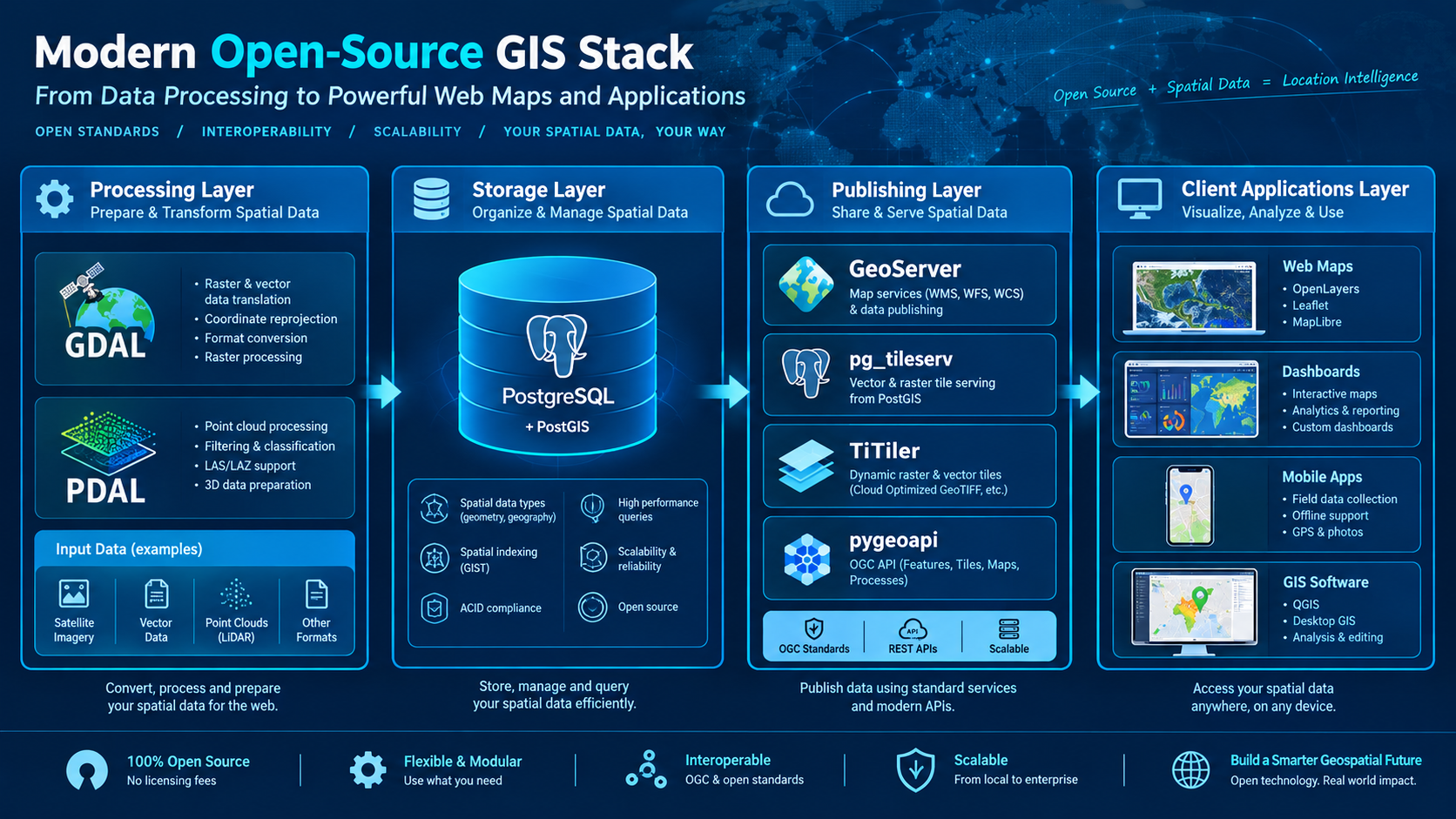
The Big Picture: Four Layers
Think of the stack as a kitchen.
Processing is the prep station. Raw ingredients get cleaned and cut.
Storage is a pantry. Everything is organised and ready to query.
Publishing is the serving counter. Different dishes go out in different formats.
Clients are the customers: web maps, dashboards, mobile apps, QGIS.
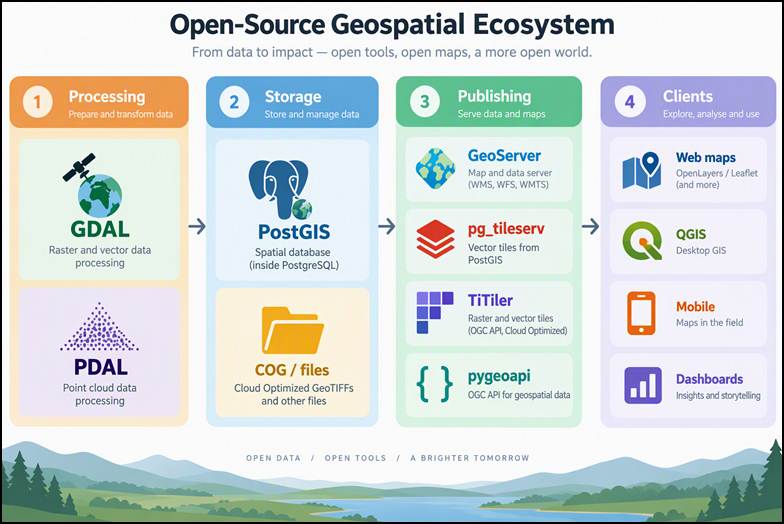 Four-layer map showing processing, storage, publishing and client tools in the open-source geospatial stack.
Layer 1: Processing (GDAL and PDAL)
GDAL: the Swiss Army knife
GDAL reads and writes almost every raster and vector format. It is usually the first tool your data meets.
Reproject data to the right coordinate system
Convert GeoTIFFs into Cloud Optimized GeoTIFFs (COG)
Build overviews so large rasters open fast
Convert between Shapefile, GeoPackage, GeoJSON and PostGIS with ogr2ogr
PDAL: GDAL's cousin for point clouds
LiDAR and drone data arrive as millions or billions of points. PDAL handles them with pipelines: small JSON files describing the steps (read, filter, classify, write).
Read LAS/LAZ files
Filter noise and classify ground points
Produce a DEM or hillshade that GDAL and the servers can use
Rule of thumb: if the data is a grid or vector, use GDAL. If it is a point cloud, use PDAL.
Layer 2: Storage (PostGIS)
PostGIS adds spatial power to PostgreSQL: geometry types, spatial indexes and hundreds of spatial functions.
Why it sits in the middle of the stack:
GeoServer, pg_tileserv and pygeoapi can all read from it
One database means one source of truth
Spatial SQL (buffers, joins, intersections) happens close to the data
Two things to get right on day one
Create a spatial index (GIST) on every geometry column
Keep the SRID consistent, or every downstream tool will behave differently
Layer 3: Publishing (the four servers)
This is where most confusion happens, so let us go one by one.
GeoServer: the full-featured publisher
Serves classic OGC services (WMS, WFS, WCS, WMTS)
Web admin UI, rich styling, and fine-grained security
Reads from many sources: PostGIS, GeoPackage, GeoTIFF, and more
Best when you need standards, styling control and user roles in one place
pg_tileserv: the vector tile specialist
Turns PostGIS tables and functions into vector tiles with almost no configuration
Lightweight and fast to deploy
Best for interactive web maps built with MapLibre or similar
Not meant for styling, security or non-PostGIS sources
TiTiler: the raster tile specialist
Creates map tiles from COG files on the fly, with no pre-generated tile cache
Let's you change bands, colour maps and rescaling through URL parameters
Best for satellite imagery, DEMs and analysis rasters
Works best when your rasters are proper COGs
pygeoapi: the modern standards server
A Python server that follows the newer OGC API family (Features, Tiles, Processes and more)
Simple YAML configuration
Returns clean JSON that developers enjoy working with
Best for open data portals and API-first projects
Side-by-Side Comparison
| GeoServer | pg_tileserv | TiTiler | pygeoapi |
|---|---|---|---|---|
Main data | Vector and raster | Vector (PostGIS) | Raster (COG) | Vector, plus other types via plugins |
Main output | WMS, WFS, WMTS and more | Vector tiles | Raster tiles | OGC API (JSON) |
Setup effort | Medium (GUI) | Very low | Low | Low (YAML) |
Styling | Strong, built in | Done on the client | Done through URL parameters | Done on the client |
Security and roles | Built in | Needs a proxy | Needs a proxy | Needs a proxy |
Best for | Enterprise and standards | Fast web maps | Imagery | APIs and open data |
Which Tool Should I Use?
Ask these questions in order:
Is my data a point cloud? Start with PDAL, then continue with the next steps on the output.
Is it a big raster or satellite image? Convert to COG with GDAL, then serve with TiTiler (or GeoServer if you need styling and standards).
Is it vector data in PostGIS and I only need a fast web map? Use pg_tileserv.
Do I need WMS/WFS, custom styling or user roles? Use GeoServer.
Do I need a developer-friendly API or open data portal? Use pygeoapi.
Three Real-World Data Journeys
Scenario | Journey |
|---|---|
City ward and road data | Shapefile → ogr2ogr → PostGIS → GeoServer (styled map) and pg_tileserv (fast web map) |
Satellite imagery | GeoTIFF → gdalwarp / COG conversion → TiTiler (dynamic tiles) |
Drone LiDAR survey | LAZ → PDAL pipeline → DEM → GDAL hillshade → GeoServer or TiTiler |
Mistakes We See Most Often
Issue 1: Everything is published through GeoServer
Cause: GeoServer is familiar, so it becomes the default for every job
Fix: Use lighter tools where you do not need styling, security or classic OGC services
Issue 2: Raster tiles are slow
Cause: The file is a plain GeoTIFF with no tiling or overviews
Fix: Convert to a COG with GDAL first
Issue 3: Vector tiles are slow or the map is empty
Cause: Missing spatial index, or a geometry in the wrong SRID
Fix: Add a GIST index and check the SRID
Issue 4: The browser blocks requests
Cause: Missing CORS settings on the tile or API server
Fix: Configure CORS on the server or reverse proxy
Issue 5: The database is exposed to the internet
Cause: Treating PostGIS as the public endpoint
Fix: Keep PostGIS private and expose only the servers, behind a reverse proxy
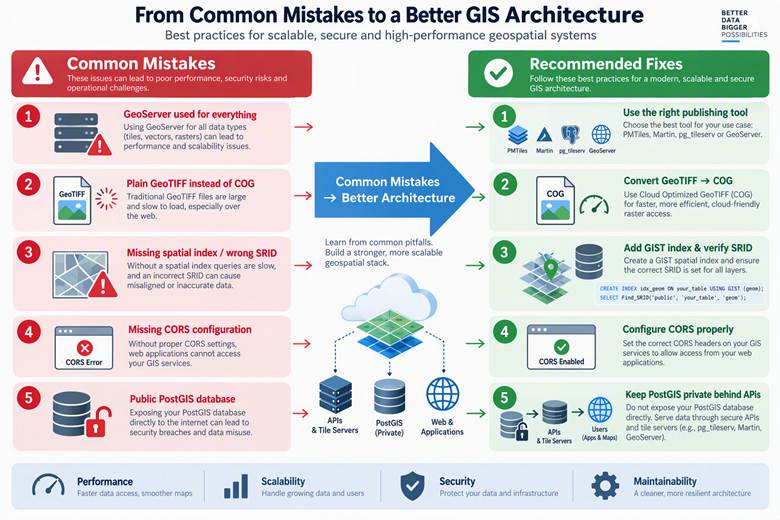
Infographic showing five common geospatial deployment mistakes and their recommended fixes, including GeoServer overuse, non-COG rasters, missing spatial indexes, CORS errors, and publicly exposed PostGIS databases
Build the Stack That Fits Your Workflow
Building a modern open-source geospatial system is not about choosing one tool to do everything. It is about understanding how the right tools work together. GDAL and PDAL prepare your data, PostGIS stores and analyses it, and publishing tools such as GeoServer, pg_tileserv, TiTiler and pygeoapi make that data accessible to web maps, applications and users.
The best architecture depends on your data, performance requirements, security needs, and the applications you want to support. You may need the full stack for a large geospatial platform, or just two or three tools for a focused project. Start with the problem you want to solve, choose the tools that fit, and add complexity only when it delivers value.
The real advantage of open-source geospatial technology lies not in any single tool, but in the flexibility to combine specialized tools into a system that works for you.
Start small, understand each component, and build your geospatial stack around the problem—not the tools.