Homepage
When you log in to VistaBridge, the Homepage provides an overview of the configured GeoServer resources and access to the main sections of the platform:
- Overview: Displays a summary of the configured GeoServer resources.
- GeoServer Layers: Displays the total number of layers configured in GeoServer.
- GeoServer Workspaces: Displays the total number of workspaces configured in GeoServer.
- Security Users: Displays the total number of security users configured in GeoServer.
- Layer Groups: Displays the total number of layer groups configured in GeoServer.
- Dashboards: Allows users to create, manage, and access dashboards for visualizing geospatial data through map widgets, charts, and other available components.
- Maps: Allows users to create, manage, and access map workspaces for viewing and working with geospatial layers.
- Account Settings: Allows users to update their profile information, manage account preferences, and change their password.
GeoServer Resource Configuration
The administrator must first add or configure these resources in GeoServer. Once added, they are automatically displayed on the VistaBridge Overview.
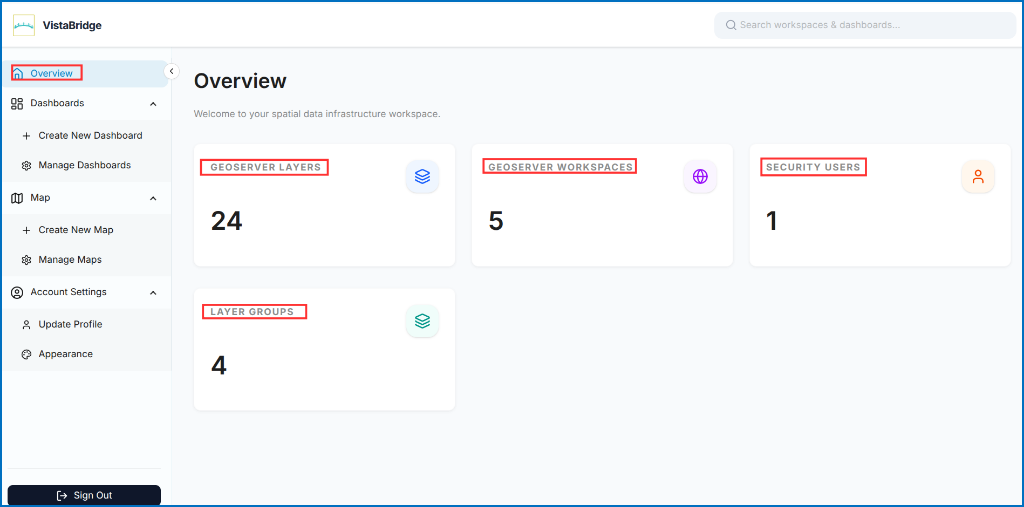 Figure: Homepage