Manage Maps Workspace
The Manage Maps section allows users to manage and preview institutional mapping workspaces: The Manage Maps section allows users to manage and preview institutional geospatial mapping workspaces.
- Search — Search by Workspace Name or Workspace ID.
- Date Filter — Filter workspaces by date.
- Preview (Eye Icon) — Open and preview the selected map.
- Create Map — Create a new map workspace.
- Use the Search option in the top-right corner to search for a map workspace by Workspace Name or Workspace ID.
- Click the Filter option to search workspaces by date.
- Click the Eye icon to preview and open the selected map.
- Click Create Map in the top-right corner to create a new map workspace.
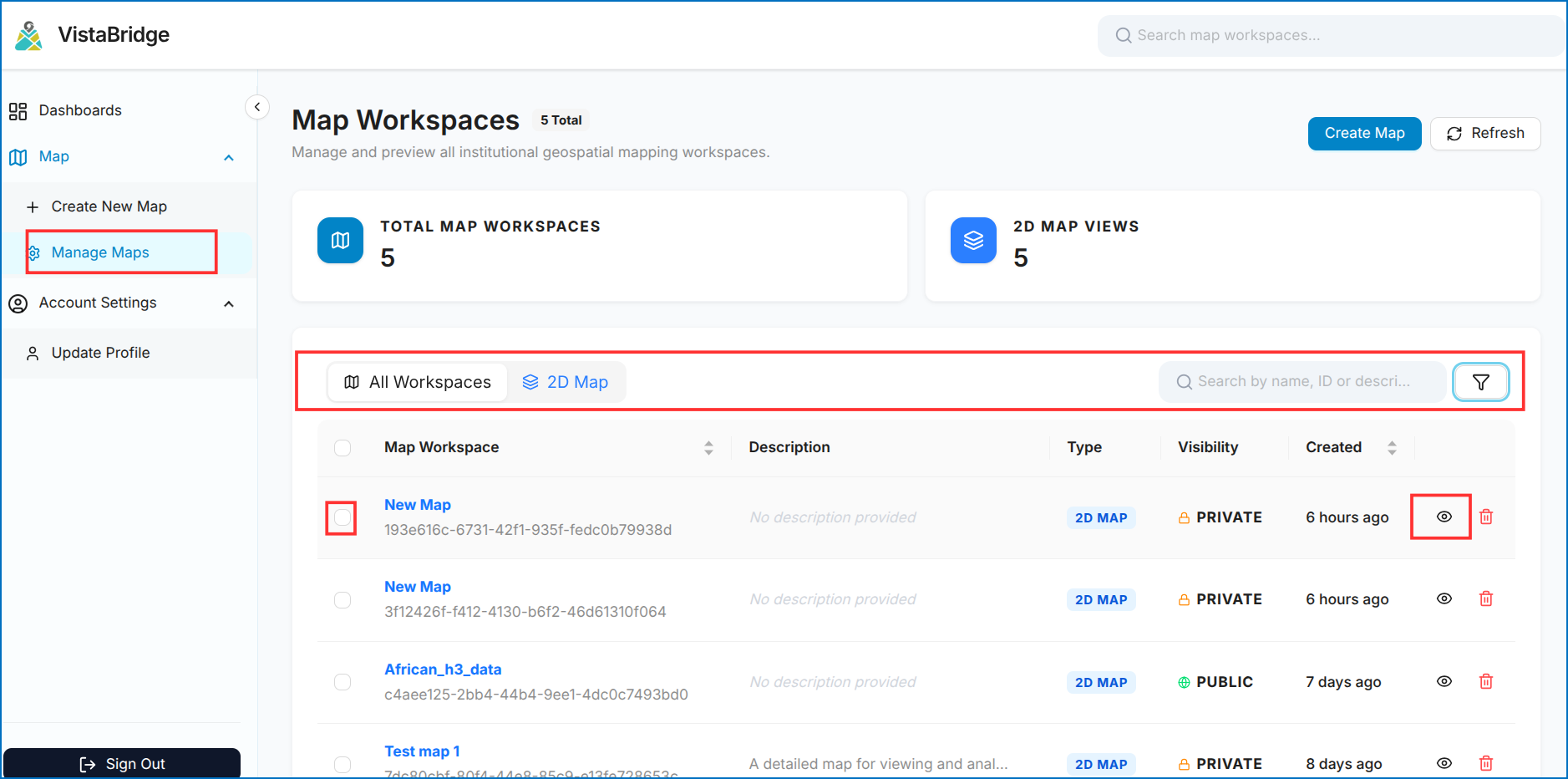 Figure: Manage Maps Workspace Directory
Figure: Manage Maps Workspace Overview
Figure: Manage Maps Workspace Directory
Figure: Manage Maps Workspace Overview